
How it works Ways to book Pricing For riders Developers Get started
Live in Accra, Ghana

Send it with a
message.

Kova moves packages across Accra for shops, pharmacies, and kitchens. Book a rider from WhatsApp, Telegram, your phone, or the web — whichever you already have open — and watch it the whole way to the door.

  • From GH₵35 for the first 20km
  • Every rider ID-checked before their first job
  • Cancel free any time before pickup
Kova Delivery online

That’s a whole delivery booked — no app to open, no dashboard to learn.

Book from wherever you already are

Most shops never open a dashboard. So Kova meets you in the apps you keep open all day — and every route creates the same delivery, with the same tracking, at the same price.

WhatsApp

Type one message. Get a tracking ID back.

Send DELIVERY on the first line, then the details on theirs. Kova creates it and replies with the tracking ID.

PICKUP_ADDRESS
Where the rider collects
DROPOFF_NAME
Who is receiving it
DROPOFF_PHONE
Their number
DROPOFF_ADDRESS
Where it goes
ITEM
What is in the package

Later, STATUS KOVA-12345 tells you where it is.

You register the number once from your account and confirm it with a code. Only verified numbers can create deliveries, so nobody can book in your name.
Telegram bot

No format to remember — the bot asks.

Where should the rider collect from?
Type the address Send a pin
Pickup set to East Legon, Accra. Who’s receiving it, and where?
Confirm Discard

Drop a location pin instead of typing an address and Kova resolves it to a street for the rider. Check status or cancel from the same menu.

Merchant app & web

Five guided steps, or one sentence.

1 Pickup point
2 Who’s receiving it
3 What’s in the package
4 Same day or next day
5 Confirm the price

In a hurry? Type the whole thing in plain words — “Pizza from QuickBites East Legon to John on 0240000000 in Madina” — and Kova fills the form in for you to check.

Open the web dashboard →

API

For shops running their own storefront.

POST /deliveries
X-API-Key: ···

{
  "deliveryType": "SAME_DAY",
  "packageSize": "MEDIUM",
  "pickup": { "address": "East Legon", ··· },
  "dropoff": { "address": "Madina", ··· },
  "recipient": { "name": "John Doe", ··· }
}

Register a webhook and Kova pushes every status change to your system as it happens, instead of you polling for it.

Read the developer guide →

Create it, and Kova handles the rest

No calling around for a rider, no haggling over the fare, no wondering where the package got to.

Step 1

You create it

Send it from WhatsApp, Telegram, the merchant app, the web dashboard, or the API. Pickup, drop-off, who’s receiving it, and whether it goes today or tomorrow.

Step 2

Kova prices and offers it

The fee is calculated from the distance and the speed you chose, before anyone is dispatched. Then the job goes out to riders who are online and nearby.

Step 3

A rider takes it

The first rider to accept gets it — exactly one, never two. They collect from your pickup point and head to the recipient.

Step 4

Everyone watches it land

Live location and a status that moves on its own, from assigned through to delivered. Your tracking ID works in whichever channel you booked from.

And when it doesn’t go to plan

A real team watches the board all day. You don’t contact them for a normal delivery — you never need to — but they are the reason the unusual ones still get resolved.

No rider free

Kova keeps offering the job. If nobody takes it in time it is flagged as unassigned, the team is alerted, and they place it with a rider themselves.

A rider declines

It moves straight to the next rider nearby. Declining costs you nothing and you won’t normally notice it happened.

Plans change

Cancel from the same place you booked, free, any time before the rider has collected it.

Something goes wrong mid-run

The rider can raise it from the app. The delivery is marked with a reason rather than quietly disappearing, and the team picks it up.

Pay for the speed you actually need

The same riders and the same tracking either way. The only question is whether it has to be there today.

Same day

Collected and delivered today.

from GH₵50 first 20km included
20–35km
+GH₵5.00 / km
Beyond 35km
+GH₵3.00 / km

Best for: Hot food, medicine, anything a customer is waiting on.

Next day

Collected today, delivered tomorrow.

from GH₵35 first 20km included
20–35km
+GH₵3.75 / km
Beyond 35km
+GH₵1.75 / km

Best for: Stock moves, documents, orders that can wait a night.

What that comes to

Distance Next day Same day
8 km GH₵ 35.00 GH₵ 50.00
20 km GH₵ 35.00 GH₵ 50.00
30 km GH₵ 72.50 GH₵ 100.00
45 km GH₵ 108.75 GH₵ 155.00

Rates beyond the included distance are charged per kilometre, so a long run never jumps in price the moment you cross a line. Work out your own route in the estimator below.

Work out a price before you book

Same rates the platform charges. Pick a speed and a distance to see the fee and exactly how it breaks down.

8 km
1 km 20 km 35 km 60 km

How the distance is charged

  1. First 20km — covered by the base fee
  2. 20–35km — charged per km
  3. Beyond 35km — charged at a lower rate per km
Next day estimate
GH₵ 35.00
Within the included distance
Base fee GH₵ 35.00
Estimated fee GH₵ 35.00

An estimate based on straight-line distance. The fee you are shown before you confirm a booking is the fee you pay — you always see it before the delivery is dispatched.

Book a delivery →

You always know which of these it is

A delivery is never just “on its way”. It sits in one named state, it moves on its own as the rider works, and you can read it from whichever channel you booked in — or push it into your own system with a webhook.

Live rider location

Watch the rider move on the map from the moment they accept.

One tracking ID

Booked on WhatsApp, checking on the web? Same ID, same delivery.

Talk to your rider

Message the rider on the delivery itself, so the thread stays with the job.

  1. Pending Priced and offered to nearby riders.
  2. Assigned A rider accepted and is heading to pickup.
  3. Picked up The package is in the rider’s hands.
  4. In transit On the way to the recipient.
  5. Delivered Handed to the person receiving it.
  6. Confirmed Closed out and settled.

And the honest ones

Unassigned No rider accepted in time. Our team is alerted and reassigns it by hand.
Cancelled You cancelled it, which you can do any time before pickup.
Failed Something went wrong on the run. The reason is recorded and our team follows up.

Why it’s safe to hand us your package

You’re giving a stranger something a customer paid for. Here is what stands behind that, in plain terms.

Riders are checked before they ride

Nobody carries a package on day one. A rider submits documents, a person reviews them, and only an approved account can go online and accept work.

  • National ID
  • Driver’s licence
  • Vehicle registration
  • Photo of themselves

Accounts are hard to take over

Two-factor authentication on rider and merchant accounts, API keys scoped to one merchant, and a verification step before any phone number can create deliveries in your name.

Riders aren’t on their own out there

Emergency contacts, an in-app safety and support route, and a team reachable while they’re on a run. A rider who feels safe is a rider who finishes the job.

Everything is written down

Every delivery keeps its full history — who created it, which rider held it, each status change and its time. Nothing about a delivery is only in somebody’s memory.

Ride when it suits you

Kova doesn’t set your shifts. You go online when you want to earn, take the jobs you want, and get paid for what you deliver.

You decide when

Go online, and jobs near you start arriving. Go offline and they stop. Declining a job costs you nothing.

See the payout before you accept

The route and what you earn are on the offer. You are never committing to a job you haven’t seen the numbers for.

Earnings you can check any time

A wallet and an earnings screen in the app — per delivery, per day, per week. No waiting until payday to find out.

Safety built in, not bolted on

Emergency contacts, in-app support while you’re out, and a team watching the board who can step in.

What you need to sign up →

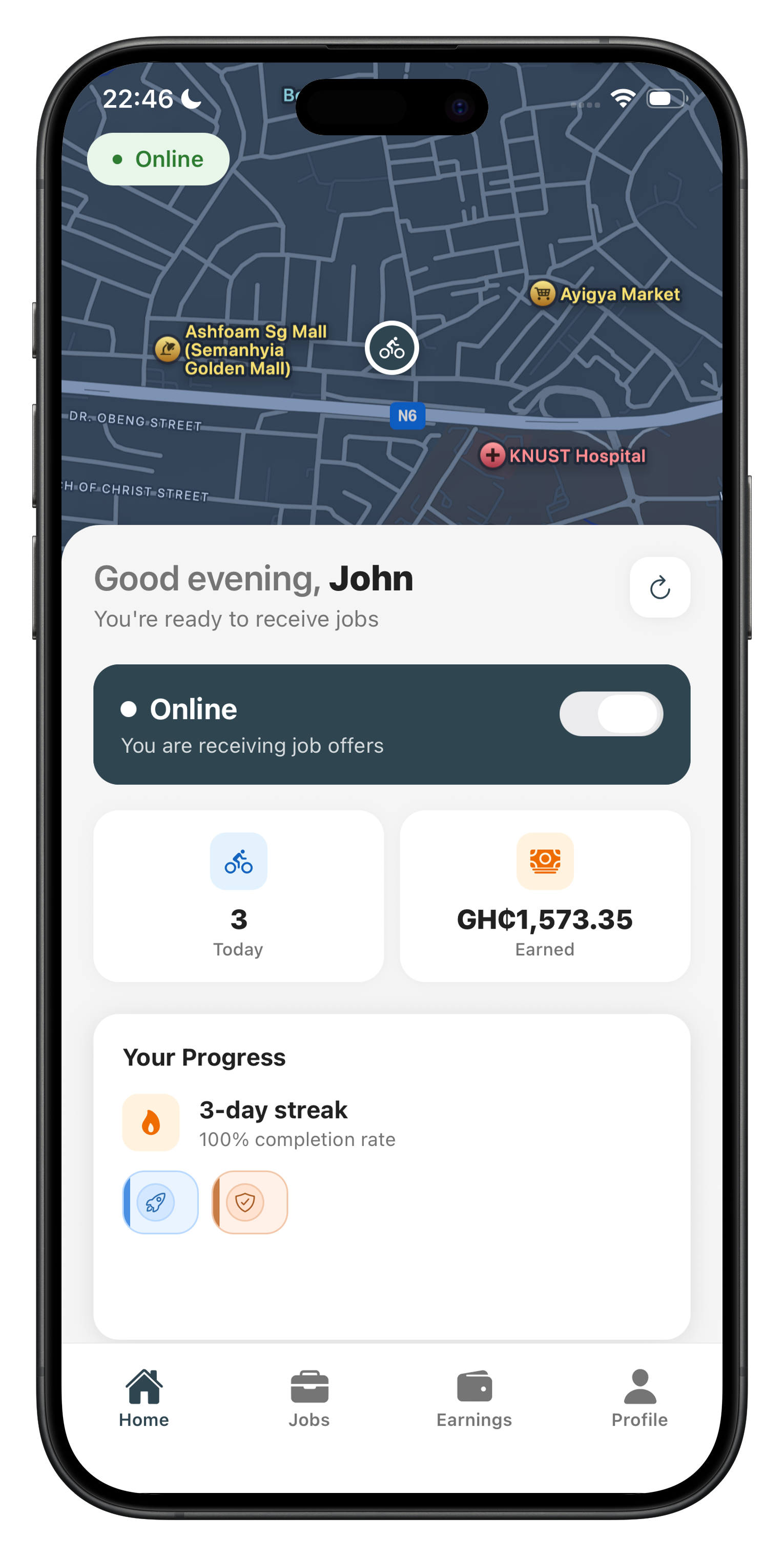
The Kova rider app: online and receiving jobs, with today’s deliveries and earnings

Or skip the interface entirely

If you already have a storefront or an order system, wire Kova into it. Create a delivery, subscribe to its lifecycle, done.

API key auth

One key per merchant, scoped so a key can only ever see its own deliveries.

Webhooks, not polling

Register a URL and every status change is posted to you as it happens.

Live socket updates

Rider positions and status changes stream to dashboards over a socket.

Plain-language parsing

Post a sentence to /merchant/deliveries/parse and get a structured draft back.

webhook payload
{
  "event": "delivery.status_changed",
  "trackingId": "KOVA-12345",
  "status": "PICKED_UP",
  "deliveryType": "SAME_DAY",
  "fee": 50.00,
  "rider": {
    "name": "Kwame A.",
    "lat": 5.6508,
    "lng": -0.1869
  },
  "occurredAt": "2026-09-22T11:04:18Z"
}
Read the developer guide →

Base URL https://api.kovadelivery.com/api/v1 — keys are issued from your merchant account.

Get your first delivery moving

Sign up as a merchant, and you can book from the web, the app, WhatsApp, or Telegram the same day. There’s no monthly fee — you pay for the deliveries you send.

Delivering in Accra, Ghana. Somewhere else? Tell us where and we’ll let you know when we reach you.